Total time: about 20 minutes · Difficulty: Medium · Prerequisite: Part 1 completed
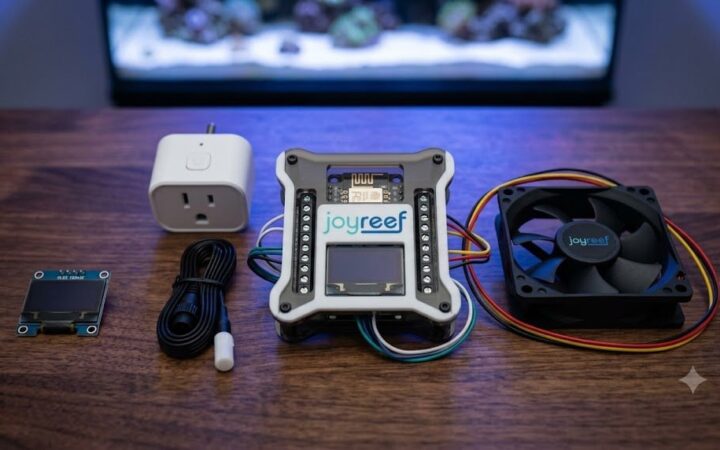
In Part 1 you wired the DS18B20 probe to the controller and plugged the fan into the smart plug. Now the portal needs to know two things: which probe reads your tank water, and which plug drives the fan. After that, a single rule is enough — not two.
Assign the probe to the controller
- Log into portal.joy-reef.com
- Go to Devices and open your controller
- In the Controller configuration panel, under Temperature probe, pick the function Tank water (or Sump, if the probe sits in the sump)
- Click Save configuration
Each function can be assigned to only one sensor: with two probes, one will be Tank water and the other Sump.
⚠️ Warning: if the temperature doesn’t show up within a couple of minutes, go back to the wiring in Part 1. The DS18B20 has three wires: red/VCC, black/GND, yellow/DATA.
Add the fan’s smart plug
If you have already paired a smart plug with the portal — for the ATO, for instance — the procedure is identical and you can skip to the next step.
- Make sure the plug is powered and on your WiFi network
- Go to the portal → Plugs and add the plug
- Give it a recognisable name, for example “Fan”
- Check that it shows up as online in the list
Create the rule: Automations → Temperature rules
Here’s the part that matters, and it’s simpler than it looks: you don’t need two separate rules for switching on and off. The portal has a dedicated temperature manager with hysteresis built in.
- Go to Automations → Temperature rules
- Turn on Enable control at the top
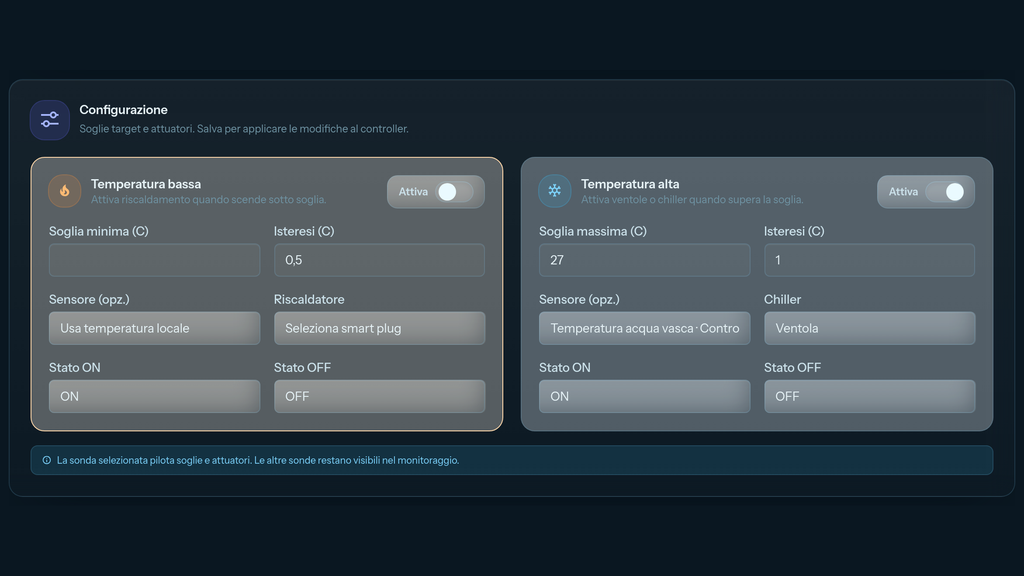
- In the High temperature panel (“Turn on fans or chiller when above threshold”) press Enable
- Fill in the panel:
- Maximum threshold (C): 27
- Hysteresis (C): 1
- Sensor (opt.): the probe you assigned earlier — leave it empty and the controller uses its local probe
- Chiller: select the “Fan” plug
- State ON and State OFF stay as ON and OFF
- Click Save settings: you’ll see “Temperature settings saved and sent to controllers”
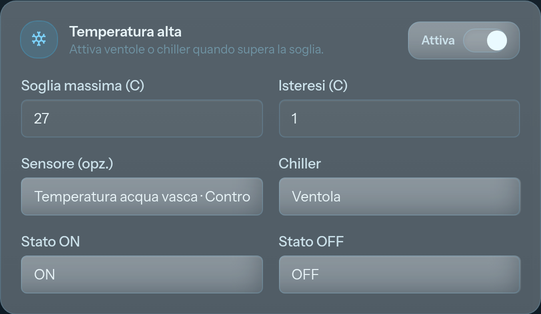
💡 How it works: above the maximum threshold the chiller turns on and stays on until the temperature drops below threshold − hysteresis. With a 27.0 °C threshold and 1.0 °C hysteresis the fan starts at 27.0 °C and stops at 26.0 °C. Hysteresis is what stops it from cycling on and off constantly.
Why here and not in the free-form Automations
The portal also has an Automations section for free-form rules, and at first glance you could build two rules there: one turning the plug on above 27 °C, one turning it off below 26 °C. It works, but it’s the worse route.
- Hysteresis is a single field here, instead of two rules you have to keep in sync by hand
- The page shows live actuator status and the target range on the thermometer
- Temperature safety checks stay active
- On updated controllers the plug also gets a safety timeout: if the controller loses its connection to the broker, the fan won’t stay on indefinitely
Rule of thumb: heater and fan/chiller belong in Automations → Temperature rules. Free-form Automations are for everything else.
Check the dashboard
Go back to the tank dashboard. You should see:
- 🌡️ Real-time temperature with the historical chart
- 🔌 The “Fan” plug status (on/off)
- ❄️ On the Temperature rules page, the target range on the thermometer and the Chiller tile lighting up while the fan runs
👉 Next part: Part 3 — Testing, maintenance and optimisation
No controller connected to the portal yet? The JoyReef beta is free and open: portal.joy-reef.com/beta
JoyReef Guide · Part 2 of 3 · v1.1 · Questions? Write to supporto@joy-reef.com